Showing posts with label Internet. Show all posts

Sunday, 13 November 2016

Internet Download Manager (IDM) v6.26 Build 9 - Full Version

1 comment
Internet Download Manager (IDM) is a tool to increase download speeds by up to 5 times, resume and schedule downloads. Comprehensive error recovery and resume capability will restart broken or interrupted downloads due to lost connections, network problems, computer shutdowns, or unexpected power outages. Simple graphic user interface makes IDM user friendly and easy to use.Internet Download Manager has a smart download logic accelerator that features intelligent dynamic file segmentation and safe multipart downloading technology to accelerate your downloads. Unlike other download managers and accelerators Internet Download Manager segments downloaded files dynamically during download process and reuses available connections without additional connect and login stages to achieve best acceleration performance.

Internet Download Manager supports proxy servers, ftp and http protocols, firewalls, redirects, cookies, authorization, MP3 audio and MPEG video content processing. IDM integrates seamlessly into Microsoft Internet Explorer, Netscape, MSN Explorer, AOL, Opera, Mozilla, Mozilla Firefox, Mozilla Firebird, Avant Browser, MyIE2, and all other popular browsers to automatically handle your downloads. You can also drag and drop files, or use Internet Download Manager from command line. Internet Download Manager can dial your modem at the set time, download the files you want, then hang up or even shut down your computer when it's done.

Other features include multilingual support, zip preview, download categories, scheduler pro, sounds on different events, HTTPS support, queue processor, html help and tutorial, enhanced virus protection on download completion, progressive downloading with quotas (useful for connections that use some kind of fair access policy or FAP like Direcway, Direct PC, Hughes, etc.), built-in download accelerator, and many others.
Version 6.26 adds Windows 10 compatibility, adds IDM download panel for web-players that can be used to download flash videos from sites like MySpaceTV, and others. It also features complete Windows 8.1 (Windows 8, Windows 7 and Vista) support, video page grabber, redeveloped scheduler, and MMS protocol support. The new version also adds improved integration for IE 11 and IE based browsers, redesigned and enhanced download engine, the unique advanced integration into all latest browsers, improved toolbar, and a wealth of other improvements and new features.

>>DOWNLOAD HERE<<

Read More...

Truecaller 7.71 Unlocked

Leave a Comment
Many a time, we receive calls from unknown numbers. We have no idea at all - as to who is calling, why they are calling - and of course, whether you should pick up the phone. Today, I'm sharing with you an unlocked app, whiich will give you the answer to all these questions.

Truecaller is the only dialer you'll ever need with the ability to identify unknown callers and block unwanted calls.

See names and photos of people who call, even if they aren’t saved in your phonebook. And know when friends are free to talk, making your calling experience smarter and more delightful.
With a community-based spam list of over 200 million users, Truecaller is the only dialer you’ll ever need.
- Always see who’s calling — works for saved contacts and unknown numbers 
- Block spam callers and telemarketers
- Search for any name or number
- Make calls directly from the app
- No more unknown numbers in your call history
- See when your friends are free to talk
- Copy a number anywhere (e.g. website or apps) and Truecaller will tell you who it belongs to.


Read More...

Sunday, 11 August 2013

Malwarebytes Anti-Malware Pro v1.75.0.1300 Incl Keygen

2 comments
Malwarebytes Anti-Malware PRO
- Taking the Byte out of MalwareMalwarebytes technology takes the next step in the fight against malware. Malwarebytes Anti-Malware PRO detects and removes malware where even the best known anti-virus and anti-malware applications fail.
- Malwarebytes Anti-Malware PRO monitors every process and stops malicious processes before they even start. The Proactive Protection Module keeps your system safe and secure with advanced heuristic scanning technology.
- Detect and Protect with ByteMalware is big and malware is bad. Your computer is constantly at risk from infection by malware including viruses, worms, trojans, rootkits, dialers and spyware. Malwarebytes specializes in fighting malware.
- If viruses are mischief, malware is mayhem. Malware doesn’t just want to disrupt your network, it wants your keystrokes, logins, passwords, address book, data, credit card information, favorite t-shirt and possibly your cat.
- Malware is not going away any time soon. Malware is growing, developing, constantly evolving. Malware is becoming more difficult to detect, and even harder to remove.
- Only the most sophisticated anti-malware techniques can detect and remove malicious programs from your computer. Malwarebytes Anti-Malware PRO combines powerful new technologies designed to seek out, destroy, and prevent malware.
- Malwarebytes Anti-Malware PRO detects AND protects in an easy-to-use, straightforward, heavy-hitting but lightweight anti-malware application.

Malwarebytes Anti-Malware PRO Features include:

  • Flash - Lightning fast scan speeds
  • Thorough - Full scans for all drives
  • Works Well With Others - Cooperative functionality
  • Puts YOU first! - Priority database updates
  • Puts Malware in the Slammer - Quarantine function holds threats and lets you restore at your convenience
  • Talk to the hand - Ignore list for both the scanner and Protection Module
  • For Your Pleasure - Customizable settings enhance performance
  • Lock It Down - Password protect key program settings
  • Chameleon - Gets Malwarebytes running when blocked
  • Toolbox - Extra utilities to help remove malware manually
  • Nitty Gritty - Command line support for quick scanning
  • RPP, Yeah You Know Me - Realtime Proactive Protection Module
  • Hablamos Everything! - Multi-lingual support (Klingon still in beta)
  • Support for XP, Vista, 7, and 8 (32-bit and 64-bit)


Supported OS:
Windows XP, Vista, 7, and 8 (32-bit and 64-bit).


Homepage: http://www.malwarebytes.org/

Installation Instructions:
- Install program.
- Run Keygen to get valid key to register application.
- Done, Enjoy.


                      >>DOWNLOAD FROM HERE<<


Read More...

Thursday, 8 August 2013

Minecraft 1.5.1

Leave a Comment
Mclogo.svgMinecraft focuses on allowing the player to explore, interact with, and modify a dynamically-generated map made of one-cubic-meter-sized blocks. In addition to blocks, the environment features plantsmobs, and items. Some activities in the game include mining for ore, fighting hostile mobs, and crafting new blocks and tools by gathering various resources found in the game. The game's open-ended model allows players to create structures, creations and artwork on various multiplayer servers or their own single player maps. Other features include redstone circuits for logic computations and remote actions, minecarts and tracks, and a mysterious underworld called the Nether. Ultimately, the completely optional goal of the game is to travel to an alternate dimension called the End, and defeat the Ender Dragon.
*NOTE* - This game is a paid game but this download offers it to you for free...


*NOTE* - Read the readme file to understand how to play the game in multiplayer mode....

>>DOWNLOAD FROM HERE<<

Read More...

Tuesday, 6 August 2013

How to access restricted links

Leave a Comment
This post is especially for those people who live in countries where adf.ly is banned. Example-India....
When you try to download stuff from other sites, you shall find that many of the download links are shortened using adf.ly. When you try to access these sites a page is displayed stating...

The requested URL /[The adf.ly url] was not found on this server. Apache/2.2.3 (Red Hat) Server at adf.ly Port 80
This is really frustrating for everybody. This error is displayed as the particalur site has been banned in your country.

There is a simple workaround to this problem-

  •  If you want to go to say http://adf.ly/QRkHX and the page doesn't load, you have to tye it againg like this https://adf.ly/QRkHX. Note the change, instead of http, type https.
  •  If it still doesn't load try adding v1 before the site link. That is http://adf.ly/QRkHX becomes http://v1.adf.ly/QRkHX
  •  If the problem still persists, go to http://anonymouse.org/anonwww.html and enter the link of the adf.ly site. 


Voila, the problem is solved!
Read More...

Wednesday, 26 June 2013

How to convert your Internet to Wi-Fi

Leave a Comment
Ever had to stay at a hotel that only provided a single ethernet port for connectivity? Using a USB modem to connect to the internet maybe? Wouldn’t it be great if you could share you internet connection without having to buy even more fiddly hardware?
Well, you’re in luck because that’s exactly what we’re going to take a look at today!

What’s this Dark Magic in my PC?

Good question! This technology is called Virtual Wifi and it’s part of every Windows 7 installation. Also called as Wireless Hosted Network, this technology lets Windows 7 machines route connections over Ethernet or even over a client station connection on the same wifi adapter.
Long story short, this technology basically allows you to turn your laptop into a fairly functional access point through which you can connect your mobile devices, or even a friend’s laptop, to the internet.

Hardware Requirements

The only requirement is that your laptop should have two networking adapters with WHQL certified drivers for Windows 7. Shouldn’t be a cause for worry though: most drivers are certified and almost all laptops come with a wired ethernet port and a wireless Wifi adapter so you should be mostly good to go.
Otherwise, all you need to do is pickup one of those cheap USB dongles to add another network adapter. That’s all you need on the hardware side.

The Easy Way

As with almost everything in life, there’s an easy way and there’s a hard, slightly more nerdy, way. Let’s look at the easier one first.
The easier way makes use of a neat little application called Virtual Router. To quote their site:
Using Virtual Router, users can wirelessly share any internet connection with any Wifi device. These devices connect to Virtual Router just like any other access point, and the connection is completely secured using WPA2, the most secure wireless encryption.
Sounds easy, right? To be honest, it actually is. And did I mention that it’s free to boot?
Grab the installation file and get installing. It’s a very benign application, weighing in at a single megabyte and takes only a few clicks to finish installation.
Do read what the installation screen says!
Once installed, you’ll get a very simply screen to configure your access point.
The Default Screen
The Default Screen
Name your network as you wish. I couldn’t really ignore the sheer awesomeness of what I was doing so I just named my network, Matrix. Be sure to give your network a strong password as well — unlike me.
Now you’ll need to select which ‘connection’ to share. If you’re connecting through ethernet, this would be a LAN connection. If you’re on a USB modem of some sort, you’ll need to pick accordingly.
If your connection doesn’t show up, it’s probably an outdated driver somewhere. Update your driver and relaunch the application.
And that’s about all there is that you need to do. Click on that big button and wait for the software to do its voodoo. A few moments later, you can connect to the network just as you would connect to a regular network. Here is how mine looked after I hooked up my phone to the network.
With a mobile device on the network

The (Slightly) Hard Way

The above sounded almost too easy? You’re a command line warrior who is ashamed to use a GUI application? Fret not! I’m here with a solution for just you.
Step #1: Open a command prompt with administrator privileges. The usual right click, followed by “Run as Administrator” should do.
Step #2: Configure your network by typing in:
netsh wlan set hostednetwork mode=allow ssid=thisisagenericssid key=opensesame
Keep in mind that the key is your network’s passphrase. The rest should be self explanatory.
Step #3: Go to your network adapter’s settings.
Network and sharing center
Right click on the adapter which has the internet connection and click on properties. Click on the sharing tab and enable Internet Connection Sharing.
Enable "Internet Connection Sharing"
Step #4: Start your network with the following:
netsh wlan start hostednetwork
How your prompt should look like
Step #5: Stand back and admire your work. You’re done!

Wrapping Up

That wasn’t as complicated or as time consuming as you thought, was it? People do tend to be quite hard on Windows but no one can deny that it comes bundled with an enormous amount of great stuff like this built in.
Let me know if you’re run into any issues setting this up and thank you so much for reading!
Read More...

Saturday, 8 June 2013

Download our new Android App

Leave a Comment
Download our new Android App: Check out our new Android App The Software Professionals. Get it here http://www.appsgeyser.com/467022

Read More...

Tuesday, 4 June 2013

Gmail Notifier Pro 5.0.1 Multilingual + Keygen | 7.4 MB

Leave a Comment
Gmail Notifier Pro is a Windows application capable of checking multiple Google Gmail accounts for new mail and display notifications. Google Calendar, Google Reader, Google News, Google Drive, Google+, Facebook, Twitter and RSS/Atom feeds are also supported. 


Feature highlights

- Check multiple Gmail accounts, including Google Apps, for new mail.
- Supports both Atom and IMAP protocols for mail.
- Supports customizable themes and individual account settings, making Gmail Notifier Pro the best looking Gmail notifier on the web!
- Read, write, reply, preview and save attachments, mark as read and delete mail without the web browser. Supports Google Contacts.
- Integration with Google Calendar accounts gives reminders for calendar events.
- Get news notifications from Google News & Google Reader.
- Supports RSS/Atom feeds to get notifications from any news source.
- Gmail Notifier Pro provides many easy-to-use features and settings.
- Define schedules when to check for mail and display notifications.
- In addition to the installation package, Gmail Notifier Pro can also run from a USB-stick without any installation.
- Gmail Notifier Pro supports automatic updates. A new version can be downloaded and installed with a single click.
- Secure account management and encrypted connections (HTTPS / SSL) are used. 100% FREE from virus, spyware and adware.
- Gmail Notifier Pro is simply the best Gmail notifier for Windows.

>>DOWNLOAD FROM HERE<<

Read More...

Friday, 24 May 2013

Internet Download Manager v6.15 Build 12 with Crack

Leave a Comment

Internet Download Manager (IDM) is a tool to increase download speeds by up to 5 times, resume and schedule downloads. Comprehensive error recovery and resume capability will restart broken or interrupted downloads due to lost connections, network problems, computer shutdowns, or unexpected power outages. Simple graphic user interface makes IDM user friendly and easy to use.Internet Download Manager has a smart download logic accelerator that features intelligent dynamic file segmentation and safe multipart downloading technology to accelerate your downloads. Unlike other download managers and accelerators Internet Download Manager segments downloaded files dynamically during download process and reuses available connections without additional connect and login stages to achieve best acceleration performance.
Internet Download Manager supports proxy servers, ftp and http protocols, firewalls, redirects, cookies, authorization, MP3 audio and MPEG video content processing. IDM integrates seamlessly into Microsoft Internet Explorer, Netscape, MSN Explorer, AOL, Opera, Mozilla, Mozilla Firefox, Mozilla Firebird, Avant Browser, MyIE2, and all other popular browsers to automatically handle your downloads. You can also drag and drop files, or use Internet Download Manager from command line. Internet Download Manager can dial your modem at the set time, download the files you want, then hang up or even shut down your computer when it's done.

Other features include multilingual support, zip preview, download categories, scheduler pro, sounds on different events, HTTPS support, queue processor, html help and tutorial, enhanced virus protection on download completion, progressive downloading with quotas (useful for connections that use some kind of fair access policy or FAP like Direcway, Direct PC, Hughes, etc.), built-in download accelerator, and many others.
Version 6.15 adds Windows 8 compatibility, adds IDM download panel for web-players that can be used to download flash videos from sites like YouTube, MySpaceTV, and Google Videos. It also features complete Windows 7 and Vista support, YouTube grabber, redeveloped scheduler, and MMS protocol support. The new version also adds improved integration for IE 10 and IE based browsers, redesigned and enhanced download engine, the unique advanced integration into all latest browsers, improved toolbar, and a wealth of other improvements and new features.

For a full list of features go here - List of IDM features

It's really awesome. I know it because I myself have been using for a long time now. It's got a really simple interface and easy to use build. The crack and the setup have been added in the following download link. 

HAPPY DOWNLOADING!!

Read More...

Monday, 13 May 2013

Free Recharge and SMS with ULtoo.com

Leave a Comment
Here is a site which is 100% genuine and it pays free recharges just for sending free smss to friends and referring friends to the site. You need to follow very simple steps to start your earning.
free recharge

> Click the link given below and fill the form to register to the site.

> After filling the form, you will receive the login password on your mobile.

> Now login to the site with the password you received on your mobile.

> That's it. Now start sending free smss to your friends and keep earning recharges. The minimum payout will be done when you earn Rs.10, and after signing up, you will get Rs.2 bonus, Now, login to your registered email id and open email confirmation mail and click on the email confirmation link you received from the website, you will get Rs.1 for email confirmation also. After that, you will get 2 paise for sending each sms, and get Rs.1 for referring each friends to this site.

> Enjoy free recharges.


After earning more than Rs.10, you have to follow these steps to get your recharge. I tested it and by God... It really worked. It recharged my mobile within 3 seconds after sending the request. Trust me, It's not fake. It's 100% genuine.
> Click you wallet to see the available balance in your account.

my wallet

> Now click RECHARGE NOW and enter the details of mobile which you want to recharge and click SUBMIT.

mobile details

> Now confirm the details by clicking PROCEED.

confirmation

> Now, as you click PROCEED button, you will get your recharge instantly, and i got my recharge within 3 seconds...!! I was really surprised with the quick service of the site. Hats off...

recharge successful


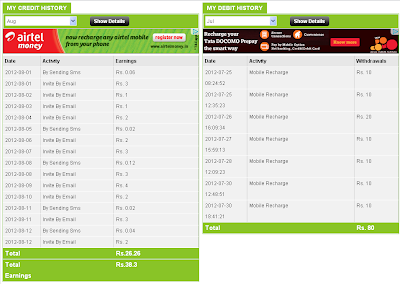
> Now click DEBIT HISTORY to see the transaction details of your account.

transaction details

Really, it's very nice and very fast. If you want to earn more and more, just use this site to send free sms instead of way2sms or any other because it gives us free money for sending free sms and it's registration is also free.
Amazing...!!
See this statement, my account balance in next month, recharged Rs.80 and having balance Rs.38.30 to recharge any mobile... :) Click Image to see full view.

Free Mobile Recharge Statement


Read More...

Sunday, 28 April 2013

Get easy money with adf.ly

Leave a Comment
* Earn more than $4.00 / 1000 visitors to your link
* Get tiny URLs, great for when text space is limited.
* All advertising is strictly family-safe with no popups.
* Real-time statistics with revenue breakdown.
* Refer users and get a massive 20% commission.
* Many tools - Mass Shrinker, Easy Link, API 
* Easy-to-reach $5.00 minimum payout.


Use This link to join Adf.ly - http://adf.ly/?id=3771776

Useful Information:

- It is almost impossible to create million-to-billion links / pages, manually. - Do not depend on your own web/blog traffic only, you will not earn a lot of money via adf.ly with your own web/blog traffic. The secret is to use other peoples traffic, every day, automatically!
- Forget about SEO, Backlinks, Article Spinning & Posting, etc - those methods will only waste your time, waste your energy, waste your money, and will make you go insane and/or even worse! - Do not try to use Auto-Clicker BOT with adf.ly, your account could get banned by using bots. Adf.ly is not as stupid as you might think. Adf.ly can detect views via any proxy, too many views via proxies will make your account get banned. It is not just about how many of your links being clicked / viewed, adf.ly can detect how many unique visitors and views simultaneously, it'll shown on adf.ly stats

-So far i tried a dozen ways to get visits on my links but none worked as great as Twitter. YES TWITTER! Why? Simply because if you get followed by many people every time you post some thing cool/nice/interesting on twitter and add a link to that thing most of your followers will check it out AND they may even retweet it.

OK lets see an example. Lets say I have about 1500 followers and I post about 3 tweets/day every of them with an adf.ly link. Out of those 1500 followers about 500 click on the link of my tweet so i get 3x500=1500 clicks DAILY. Now just think that you can get as many followers as you want/like/can and post as many tweets you want every day. You could even make yourself a living with the money earned from this !


-Note: 
There are lot of people ask about if  they can post Adfly banner or use Adfly website script on the same websites or blogs with Google AdSense??..and the answer is..Yes of course you can because adfly and Google AdSense its different service adfly paid to view and Google AdSense paid to click so there no problem with it .
Read More...

Sunday, 7 April 2013

Connectify Hotspot Pro 4.3.0.26370

Leave a Comment

Connect to multiple Internet connections for their combined speed and reliability. With just a couple clicks, you’ll be cruising the web at warp speed. The more Internet connections you have, the faster you’ll go!


Multiple Connections, Maximum Speed For the first time, you can connect to the coffee shop Wi-Fi and your 4G mobile device simultaneously, using both Internet connections for their combined speed, and increased reliability.  With Connectify Dispatch, you can even use two different Wi-Fi networks at the same time. Just connect a secondary USB Wi-Fi card (in addition to your laptop’s on-board Wi-Fi card) and Dispatch does the rest. At the click-of-a-button, you’ll be cruising the web at warp speed, using the combined throughput of both wireless networks. Even if you lose connectivity on one of those networks, Dispatch keeps you online, moving all of your traffic onto the working connection until both networks become available again.

Share your Super-Fast Dispatch Connection with Connectify Hotspot 
Connectify Dispatch is even more powerful when you use it alongside our flagship software router, Connectify Hotspot PRO. Just start a Connectify Hotspot while aggregating Internet connections with Dispatch, and in an instant you’ll be sharing your Dispatch “super connection” over Wi-Fi with all of your friends, co-workers, and other devices.
 

Connectify Hotspot 4.3.0.26370 Pro 

  • New Driver Update: Software works even better with Windows 8 and prevents crashes, BSODs, and freezes that some of our users were experiencing.
  • Update: Better detection for corrupted Connectify driver installs
  • Update: Connectify Dispatch v4.3 drops support for Windows XP and Windows Vista. Users running XP and Vista can continue to use ConnectifyDispatch v4.2
  • Update: Connectify Dispatch has upgraded to the .NET 4.5 Framework. The installer will prompt Windows 7 users to install .NET 4.5 if it is not already installed.
  • Feature: Dispatch allows users to share on Facebook or Twitter from the Dispatch Dashboard and makes it easy to post screenshots of the Dashboard.
  • Feature: Connectify Hotspot and Dispatch UIs allow the user to set whether they should start when Windows starts.
  • Feature: Troubleshooter now allows the user to specify whether they are trying to troubleshoot Hotspot or Dispatch.

>>DOWNLOAD FROM HERE<<

Read More...